Any notch you want. Just ask your agent.
NotchNull is the notch you rebuild by asking. Tell Claude Code or Codex, on your own Mac, what it should be: new widgets, colors, animations, tabs, even its Settings page. Your agent edits the files or the source, checks a render, and your notch changes.
Open source · Works with the Claude Code and Codex already on your Mac · macOS 14+
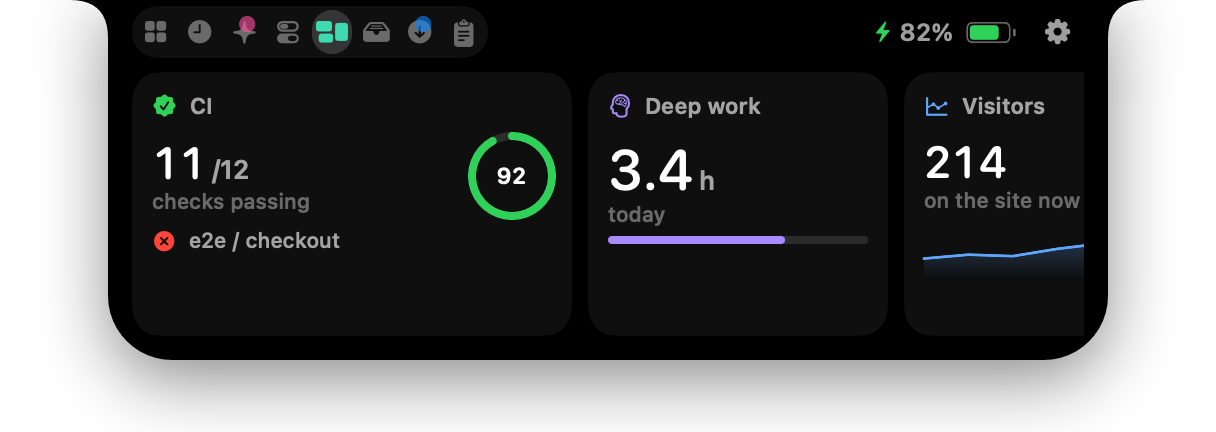
“A panel with CI, my focus hours and site traffic.”
Your agent wrote three JSON files in ~/.notchnull/widgets, each a command and a view. Saved, they are live.
Other notch apps ship their notch. NotchNull ships yours. Like Arch Linux, it is a small, fast base you shape into anything, except you never read the wiki: your agent did. Widgets, colors, animations, tabs, the Settings page, the Swift source. Ask, and it is rebuilt.
Ask for it. Your agent builds it.
The notchnull skill teaches Claude Code and Codex the whole notch: widget files, settings.json, the CLI, and a render command, so the agent checks its own work before it tells you it is done.
You ask
In plain words, in the agent you already use.
“Add a CI widget for this repo, and show a red wing beside the notch while it’s failing.”
Claude Code, with the notchnull skill It writes a file
A widget, a setting, a wing. Saved, it is live.
~/.notchnull/widgets/ci.json
{
  "title": "CI",
  "refresh": 60,
  "command": "gh run list --json … --jq …",
  "view": {
    "type": "value",
    "value": "{{data.failing | count}}",
    "label": "failing workflows"
  },
  "wing": {
    "when": "{{data.failing | count}}",
    "tint": "red",
    "trailingText": "{{data.failing | count}} failing"
  }
}
It checks the render
The notch drawn to a PNG, so it sees what you will.
notchnull render ci.png --wingTerminalFileEditViewTue 9:41 AM
- Widgets
- A shell command and a view tree of values, gauges, lists, sparklines and buttons. Errors show in the card, never a silent blank.
- Wings
- Anything beside the camera while a condition holds: a failing check, a running deploy. It goes away on its own.
- settings.json
- Every setting in one file, synced both ways with the Settings window. Unknown keys and bad values are reported.
- CLI and local API
- notchnull show, open, widget data, settings set. Or POST to 127.0.0.1 with your token.
- Render
- notchnull render draws the notch with your files, so an agent can judge its own work before telling you it is done.
- The source
- When files are not enough, the skill shows the agent how to change the Swift app itself and rebuild it. GPL-3.0.
Start here. Install the skill from Settings › Build, then paste this into your agent.
Use the notchnull skill: add a widget with my open pull requests, and show a red wing beside the notch while CI is failing.Start with a preset. Change everything else.
Setup opens the first time you launch NotchNull: classic notch or floating island, Minimal, Balanced or Complete, and one of twelve looks. None of it is fixed. Each one is a file, and after you pick, your agent can change anything.
- TerminalTue 9:41 AM

Classic notch
Grows out of the camera housing, with music and activities in its wings.
- TerminalTue 9:41 AM

Island
For screens, or resolutions, without a notch: a clock pill and two satellites inside the menu bar.
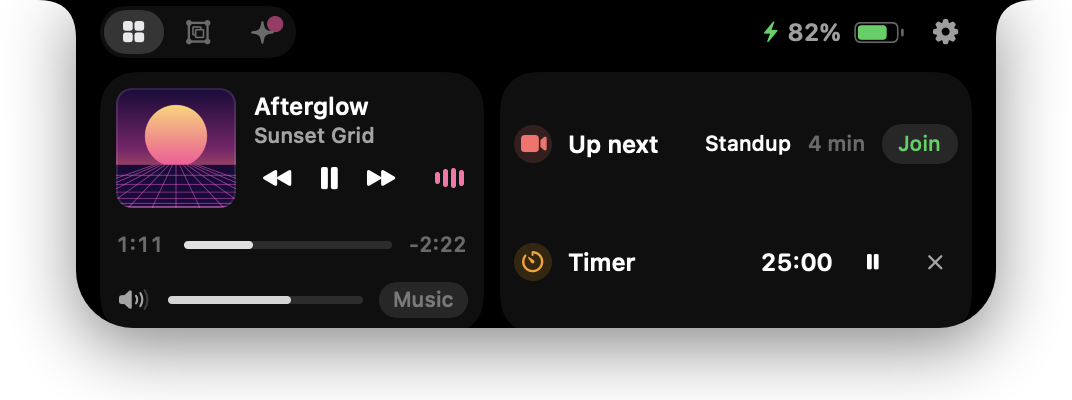
Minimal
Music, your widgets and what matters today. Nothing slides out unless it needs you.
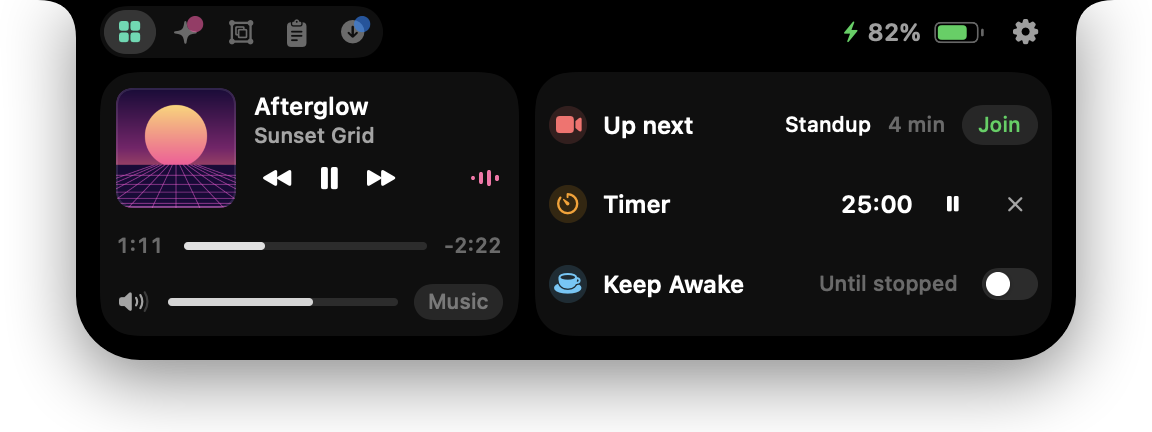
Balanced
The everyday set: agents, music, clipboard, downloads that clean themselves, your widgets.
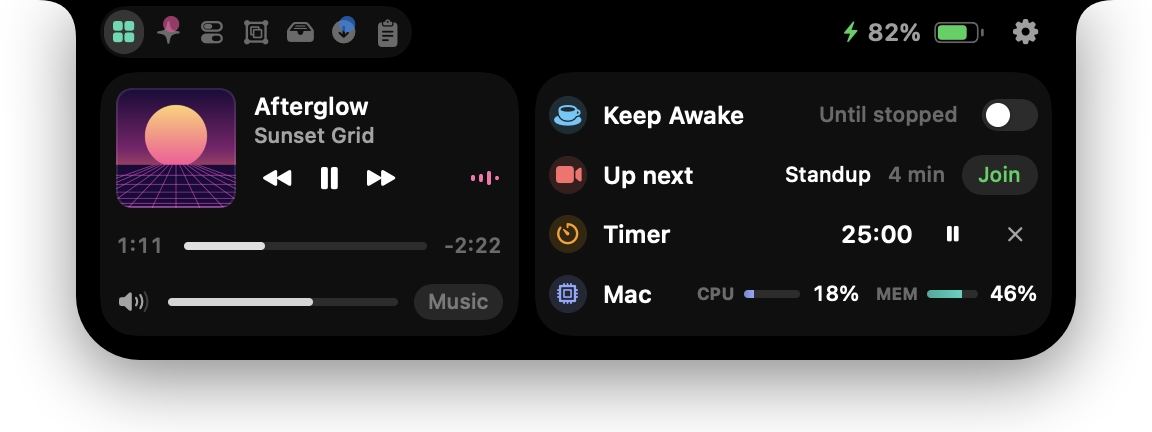
Complete
Everything NotchNull does, the way it ships: every tab, every activity, Mac stats.
Then ask for anything. Your agent can change all of it.
- Widgets
“A card with today’s Stripe revenue.”
A command and a view tree, one file in widgets/.
- Wings
“A red dot by the camera while prod is down.”
Beside the notch while a condition holds, gone when it stops.
- Look
“Plum, a pink accent, rounder corners.”
Body, tint, accent, Liquid Glass and roundness.
- Motion
“Slower, and no bounce.”
Spring speed and bounce, and the light it gives off.
- Layout
“Make it a floating island, and a wider panel.”
Notch or island, tabs, Home rows, and any size you type.
- Activities
“Stop showing me when it’s charging.”
Which events slide out, one switch each.
- Settings page
“Add a section with my widgets’ options.”
The Settings window is SwiftUI in the repo, and the skill shows where.
- Anything else
“A radial gauge, and a tab for my servers.”
New views, tabs and integrations: your agent changes the source and rebuilds.
An example of everything.
The skill ships in the repo and inside the app. In Settings, Setup applies the presets and looks, and Build › Examples adds a widget in one click, as a file you can change.
- SKILL.mdThe skill your agent reads: the loop, every file, taste and safety.
- examples/Working widgets: CI with a wing, open PRs, disk, a todo list, a world clock.
- presets/Minimal, Balanced and Complete, each with its render.
- themes/Twelve looks, from Graphite and Plum to Terminal, Frost and Brutal.
- references/The widget format, every setting, the CLI and API, and a map of the source.
It also watches your agents.
Built in, before you change a thing: Claude Code, Codex and opencode limits at a glance, an alert the second an agent needs you, and the final message when a turn ends.
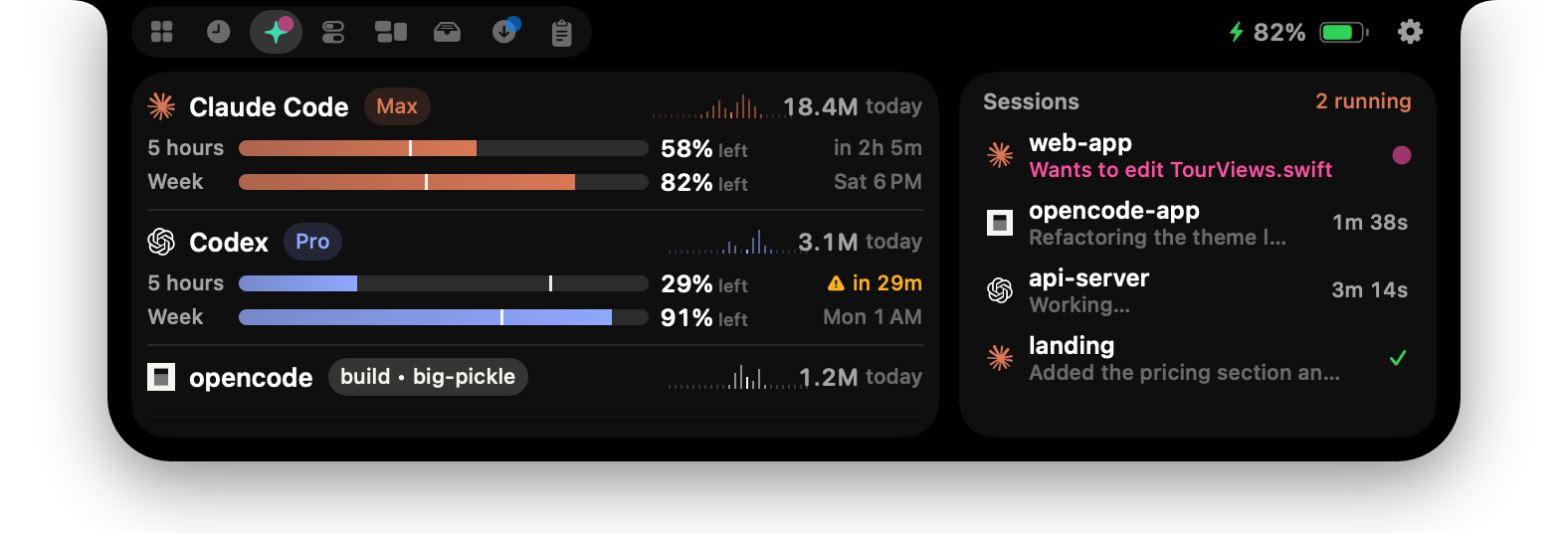
- Limits as % left
- Claude Code and Codex 5-hour and weekly limits, reset times, and a pace forecast that warns before you run out. GLM, Kimi, MiniMax, OpenCode Go and Copilot plans show up too.
- Needs you
- The notch lights up the moment an agent asks for permission or asks you a question, with the project, its terminal and the question itself. Several at once stack in one banner. Click to jump to the exact terminal.
- Done, with the summary
- When a turn ends you see the agent's final message and how long it took.
- Live sessions
- Every running Claude Code, Codex and opencode session, detected from their transcripts. Tokens today, by the hour.
One panel. Everything you reach for.
Hover the notch and it opens: Home, what it told you lately, your agents, Control Center, your widgets, downloads counting down, a file tray and clipboard history.
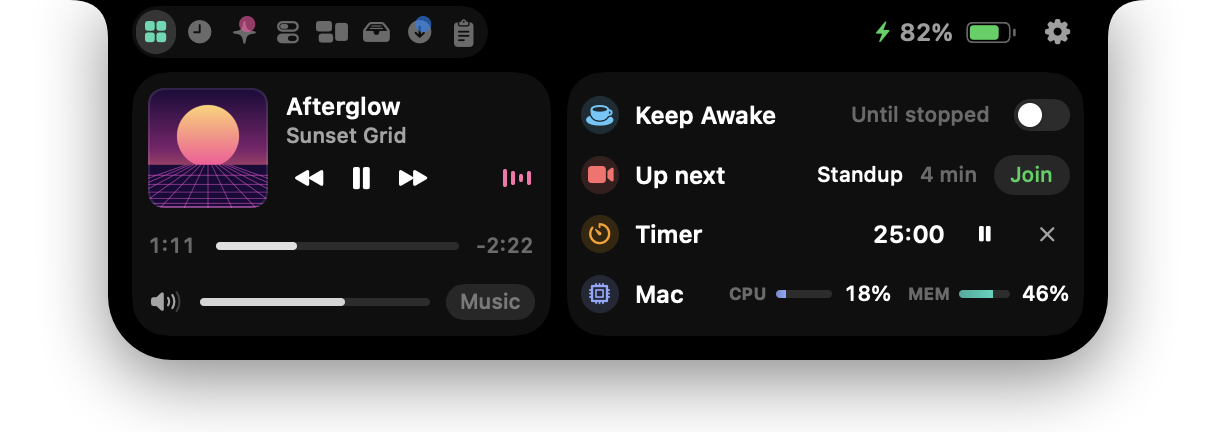
Make it yours: notch and panel size, roundness, a black, tinted or Liquid Glass body, accent color, animation speed and bounce, tab order, Home rows, which activities appear, and anything else your agent can write.
Things slide out of the notch, then tuck back in.
Every activity is the same black surface morphing out of the hardware. Nothing pops; everything condenses into place.
Island mode
No notch on the screen, or a resolution that leaves it out? It floats as an island with a clock, and its satellites grow into a music card and a Control Center with battery, toggles and sliders on hover.
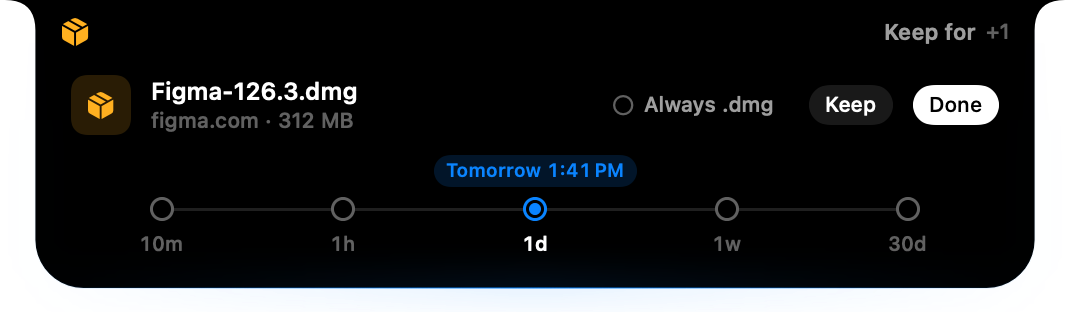
Downloads that expire
Each new download asks how long to keep it, from 10 minutes to 30 days. Then it goes to the Trash, with Undo.

Any player
Spotify, Music, and videos in your browser. Artwork, scrubbing, output volume.

Volume & brightness
A one-line HUD in the notch that can replace the system one.

Dev boards
ESP32, Arduino, CH340 and FTDI boards announce themselves with their serial port.

Every device
Bluetooth headphones with AirPods battery, keyboards, mice, controllers, drives, displays, AirDrop.

Power
Charging, unplugged, low battery — and a battery color for Low Power, Automatic and High Power, red at 10% or less.

Downloads & screenshots
Progress while it downloads, a preview when a screenshot lands, one click to keep it.

Timers & meetings
Countdowns in the wings and your next meeting with a Join button.
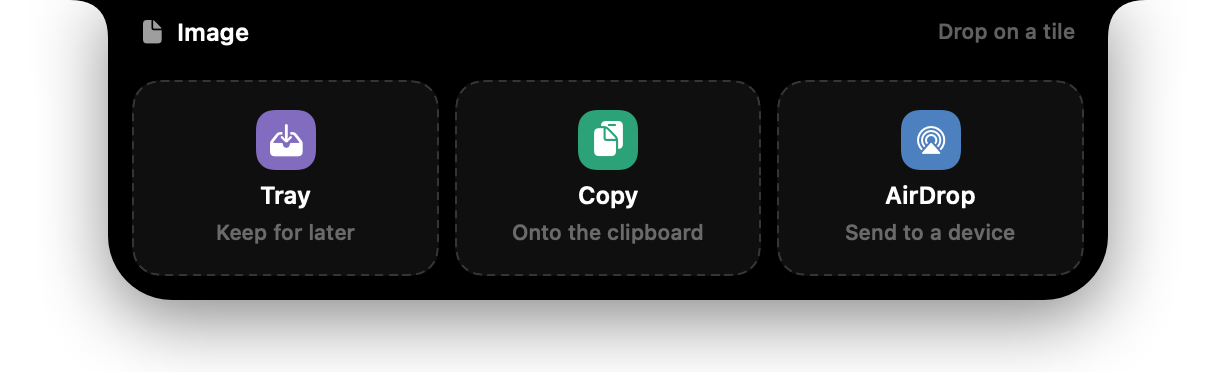
Drop zone
Drag a file toward the notch to park it in the Tray, copy it or AirDrop it.
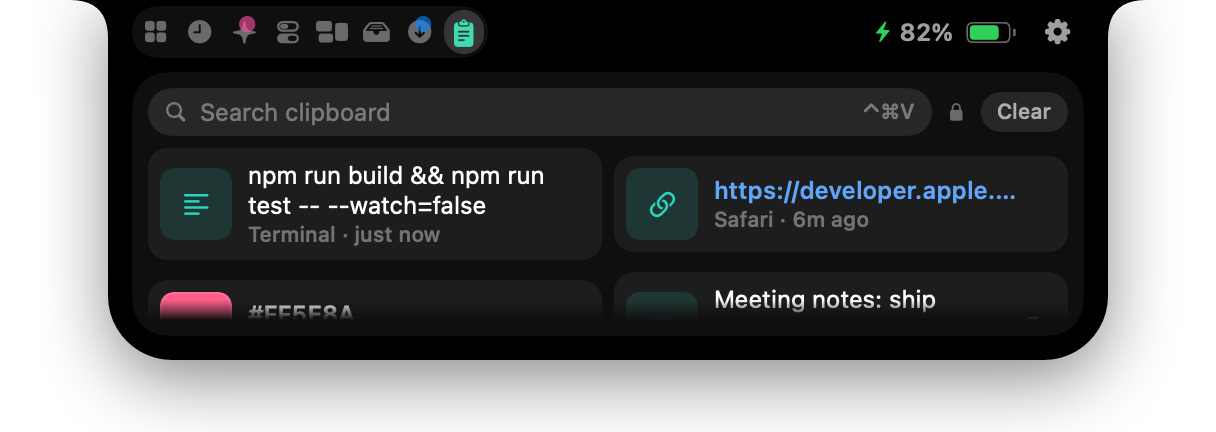
Clipboard history
Encrypted on your Mac, with real previews of images and files.
It reads your agents. So you can read it.
NotchNull looks at your transcripts, your clipboard and your Claude login. That is exactly why it is open source.
- No telemetry
- No analytics, no accounts, no server.
- One request
- Your Claude usage, fetched with the login already on your Mac. The token is never refreshed or stored.
- Encrypted clipboard
- History is sealed with AES-GCM; password managers are skipped.
- Read the source
- GPL-3.0. Every file NotchNull reads and writes is listed in PRIVACY.md.
Thirty seconds to a notch of your own.
Download NotchNullOpen source · Works with the Claude Code and Codex already on your Mac · macOS 14+ · GPL-3.0
- 1
Download NotchNull.zip and move the app to Applications.
- 2
It is not notarized by Apple yet, so right-click it → Open the first time, or run:
xattr -dr com.apple.quarantine /Applications/NotchNull.app - 3
Grant only the permissions you want. Every one is optional.